
If you moderate a subreddit and go looking for a list of the best apps to install, you will find two things: Reddit’s own documentation, which explains the platform but recommends nothing, and a handful of threads in r/ModSupport where moderators trade recommendations from memory. There is no ranked list anywhere, which is odd, because Reddit publishes the installation count of every public app.
So this is that list. Every number below comes from the App Directory sorted by popularity, read on 25 August 2026. Install counts move, so treat these as a snapshot rather than a permanent ranking, and the order matters more than the exact figures.
One thing becomes obvious the moment you read the top of the list, and it is worth saying before the table starts.
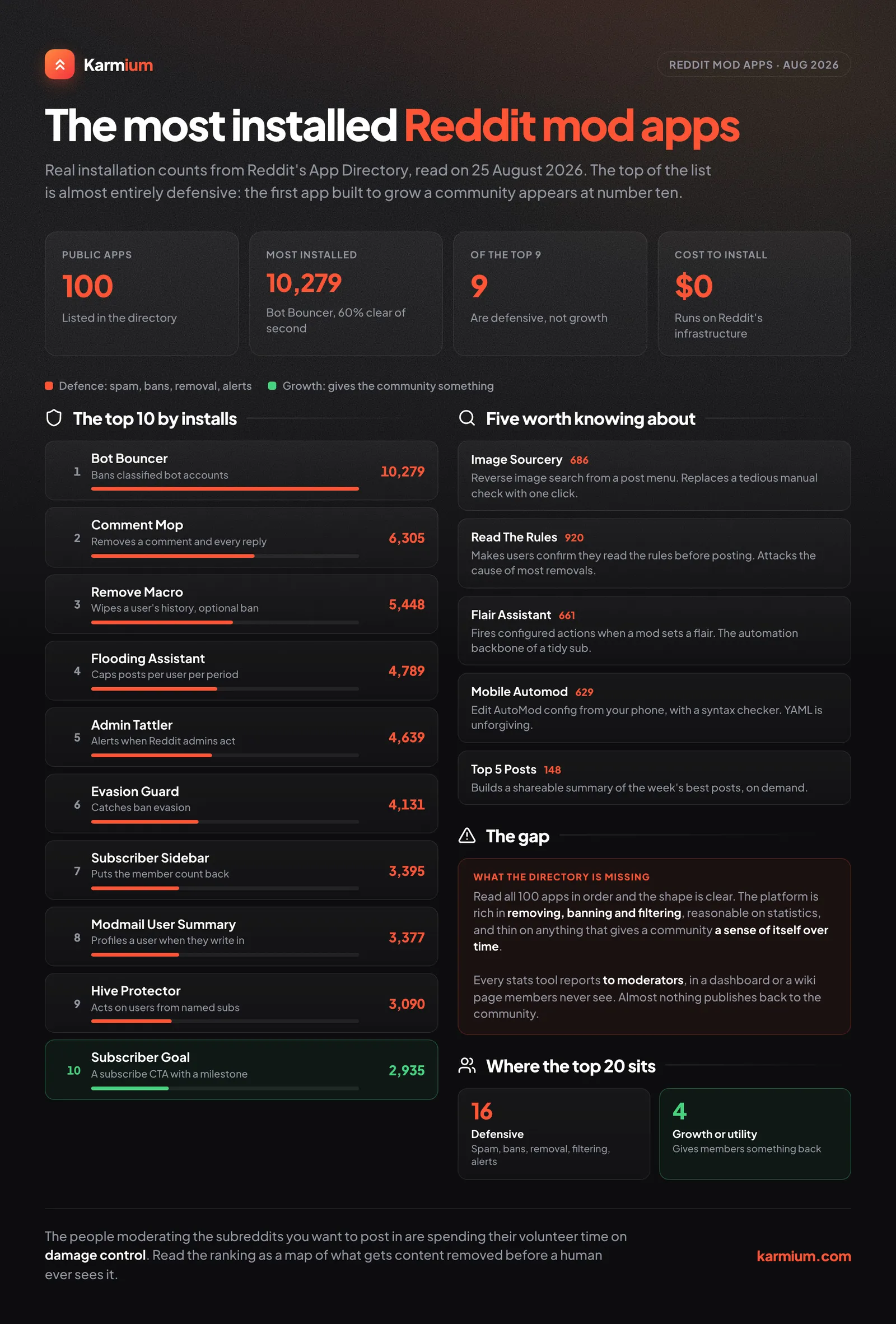
What the Rankings Actually Tell You
The ten most installed apps on Reddit’s developer platform are, almost without exception, defensive. Bots, ban evasion, flooding, spam, admin actions, mass comment removal. Not one of the top five does anything to grow a community or make it more interesting. They exist to stop things from happening.
That is not a criticism of the apps, which are excellent. It is a description of what moderating a subreddit is actually like, and it is the single most useful piece of information in this entire article for anyone thinking about Reddit as a marketing channel. The people running the communities you want to post in are, by revealed preference, spending their volunteer time on damage control. A brand that shows up asking for a favour is asking it of someone whose tooling budget is entirely allocated to keeping bad actors out.
The 20 Most Installed Apps
1. Bot Bouncer (10,279 installs). Bans accounts classified as bots or similarly harmful across participating subreddits. The most installed app on the platform by a comfortable margin, roughly 60% ahead of second place.
2. Comment Mop (6,305). Removes or locks a parent comment and every reply beneath it, in one action. Every mod has needed this at 2am.
3. Remove Macro (5,448). Removes a user’s entire posting history from your subreddit, with an optional ban attached.
4. Flooding Assistant (4,789). Restricts users to a configurable number of posts in a given period. The defence against someone dumping fifteen posts in an hour.
5. Admin Tattler (4,639). Notifies you when Reddit’s own admins take action on content in your subreddit, via modmail, Slack or Discord. Mods otherwise find out by accident.
6. Evasion Guard (4,131). Detects ban evasion and removes the content or bans the alt.
7. Subscriber Sidebar (3,395). Puts your subscriber count back in the sidebar after Reddit removed it. Supports mobile, Shreddit and old Reddit.
8. Modmail Quick User Summary (3,377). When someone writes into modmail, it generates a summary of that user so you can decide quickly instead of opening six tabs.
9. Hive Protector (3,090). Reports or removes content from users who participate in a specified set of other subreddits. Blunt, effective, and the app most likely to start an argument about fairness.
10. Subscriber Goal (2,935). A call-to-action subscribe button with a visible membership milestone and progress tracking. The first genuinely growth-oriented app on the list, at number ten.
11. Community Home (2,858). Adds moderator-only post types: home posts and topic posts, with reminders, polls and contests.
12. Subreddit Statistics (2,848). Detailed monthly post and comment statistics written to an automatically updated wiki page.
13. Spotlight (2,159). Lets OPs, mods and trusted users pin a relevant comment to add context to a thread.
14. Banhammer (2,150). Ban a spam account across every subreddit you moderate at once.
15. Modmail Automator (2,071). Automoderator, but for modmail: autoresponders, ban appeal automation, rule-based routing.
16. NSFW Post Remover (1,859). Auto-removes NSFW-tagged posts and notifies the author with a sticky comment.
17. Ban Extended (1,588). Bans a user and removes their content in the same action, built for cleaning up flood campaigns.
18. Modqueue Nuke (1,372). Purges the modqueue by age, report count, score or keyword match.
19. Trending Tattler (1,171). Alerts you when a post hits r/popular or r/all, so you can prepare before the traffic arrives. If you run a brand subreddit, this is the one that tells you something is happening before your mentions explode.
20. Lock Removed Posts (1,146). Automatically locks comments on removed or deleted posts.
Five Worth Knowing About
Install counts reward apps that solve universal problems, which means genuinely good apps aimed at narrower needs sit far down the list. These five are not the most popular and are not trying to be.
Image Sourcery (686 installs). Adds a menu option that reverse image searches a post. For any subreddit dealing with reposted or stolen images, this replaces a tedious manual workflow with one click.
Flair Assistant (661). Triggers configured actions automatically when a mod sets a post’s flair. This is the quiet automation backbone of a well-run subreddit: flair a post as “Solved” and let the app lock it, comment, and tag the author without anyone doing it by hand.
Mobile Automod (629). Edit your AutoModerator configuration from the Reddit mobile app, with a syntax checker. AutoMod config is YAML, YAML is unforgiving, and until this existed a broken rule at the weekend meant finding a laptop.
Read The Rules (920). Requires users to confirm they have read the rules before posting. Worth including because it addresses the failure mode behind most brand removals: people genuinely do not read subreddit rules, which is a problem we have written about at length.
Top 5 Posts (148). Generates a shareable summary of your community’s top posts. A small app doing something the platform should arguably do itself.
The Gap in the Directory
Read all 100 public apps in order and a pattern emerges. The platform is extremely well served for removal, banning and filtering, reasonably served for statistics, and thinly served for anything that gives a community a sense of itself over time.
Subreddit Statistics writes numbers to a wiki page. Subscriber Sidebar shows a count. Top 5 Posts produces a summary on demand. What almost nothing does is the thing many communities already do by hand every week: publish a recap post that tells members what happened, who contributed, and what was worth reading.
That is the gap our own app was built for. Community Recap publishes an automatic weekly recap of a subreddit as an ordinary text post: top posts, most discussed threads, best comments, subscriber milestones, and a by-the-numbers section comparing the week against the last one. Moderators pick the day, the hour and which sections appear, and a preview action sends the whole thing to your inbox before anything is published. It is new, so it is nowhere near this list, and we would rather say that than pretend otherwise. If you want the detail, we wrote a full walkthrough of how to automate a weekly subreddit recap.
How to Actually Install Any of These
Go to developers.reddit.com/apps, which sorts by popularity, name or creation date. Open an app and click “Add to community”. You need to be a moderator of the subreddit with the relevant permissions, and most apps then need configuring in the subreddit’s app settings page. Apps installed this way run on Reddit’s infrastructure, not yours, and there is no cost.
Two things worth knowing before you install anything. Every public app has been through Reddit’s review process, which involves a human reading the code and checking it against the Devvit Rules, so the quality floor is higher than an open store. And apps declare their permissions explicitly: an app that wants to read Reddit data, use storage or contact an external service has to say so and get it approved. If you want the mechanics of how the platform works underneath, that is what Devvit is and why it matters.
What This Means if You Are a Brand
If you run your own subreddit, this directory is free infrastructure and most brand communities use none of it. At minimum: Trending Tattler so you know when a post breaks out, Read The Rules to cut removals, a flooding or spam app appropriate to your size, and something that gives members a reason to come back. That is an afternoon of setup for a permanent reduction in manual work.
If you are marketing into other people’s subreddits, the ranking above is a map of what moderators are defending against. Read it as a list of the behaviours that get content removed automatically, before a human ever sees it, and calibrate accordingly.
Setting up a community and unsure what to install, or what to automate before it grows? Tell us what you are building.